What is JWT?
JSON Web Token (JWT) is an open standard (RFC 7519) for securely transmitting information between parties as a JSON object. It's become the de facto standard for authentication in modern web applications, REST APIs, and microservices architectures.
Unlike traditional session-based authentication where the server stores session data, JWT enables stateless authentication. The token itself contains all the information needed to verify the user's identity, eliminating the need for server-side session storage.
This makes JWT perfect for distributed systems, microservices, and mobile applications where maintaining server-side sessions becomes complex and inefficient.
JWT Structure: Three Parts, One Token
A JWT consists of three parts separated by dots (.):
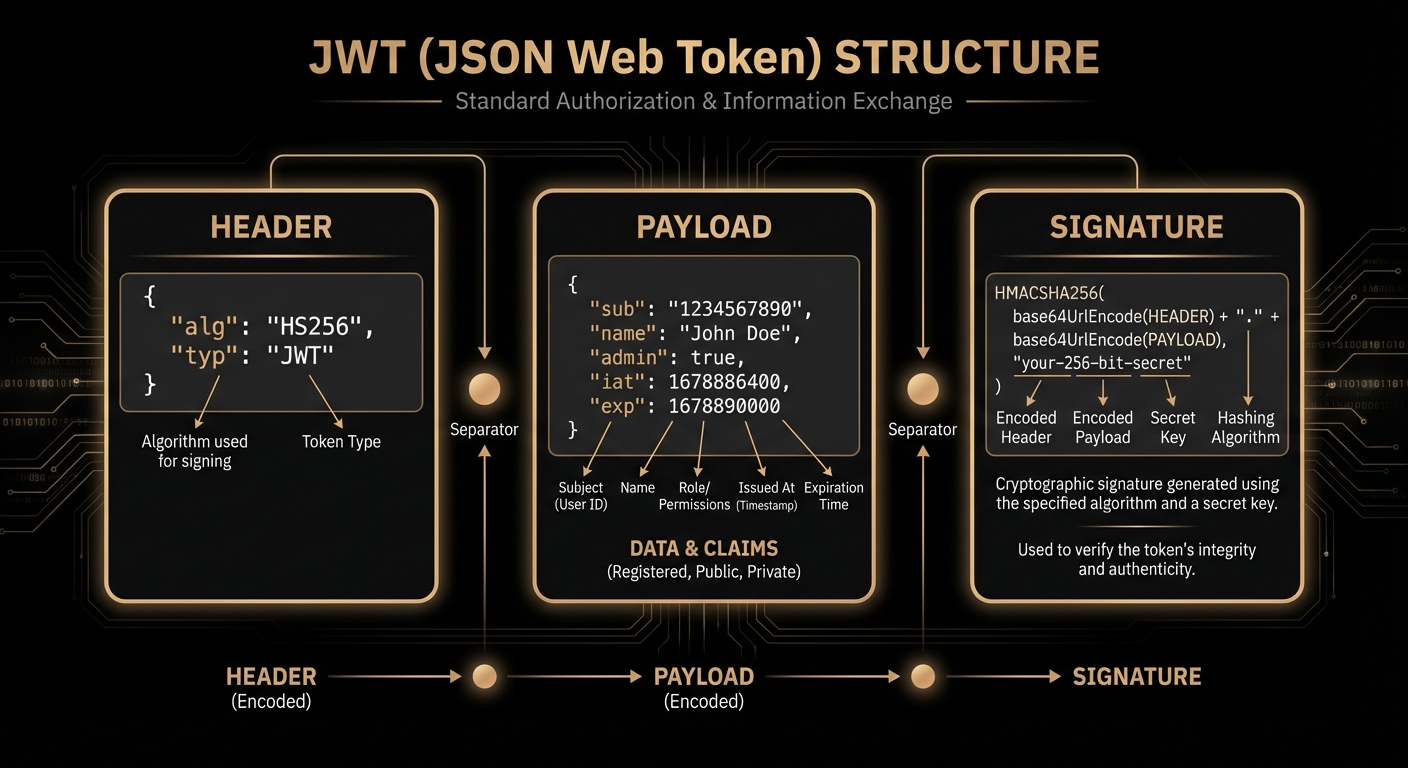
The three components of a JSON Web Token
1. Header
The header typically consists of two parts: the token type (JWT) and the signing algorithm being used (e.g., HMAC SHA256 or RSA).
{

  "alg": "HS256",

  "typ": "JWT"

}
This JSON is then Base64Url encoded to form the first part of the JWT.
2. Payload
The payload contains the claims—statements about the user and additional metadata. There are three types of claims:
- Registered claims: Predefined claims like
iss(issuer),exp(expiration),sub(subject),aud(audience) - Public claims: Custom claims that should be defined in the IANA JWT Registry or use collision-resistant names
- Private claims: Custom claims agreed upon between parties
{

  "sub": "1234567890",

  "name": "Omar Dawoud",

  "email": "omar@example.com",

  "role": "admin",

  "iat": 1516239022,

  "exp": 1516242622

}
3. Signature
The signature is what makes JWT secure. It's created by taking the encoded header, encoded payload, a secret key, and the algorithm specified in the header.
HMACSHA256(

  base64UrlEncode(header) + "." + base64UrlEncode(payload),

  secret

)
The signature ensures that the token hasn't been tampered with. If someone modifies the header or payload, the signature verification will fail.
How JWT Authentication Works
Understanding the complete authentication flow is crucial for implementing JWT correctly. Let's walk through the entire process step by step.
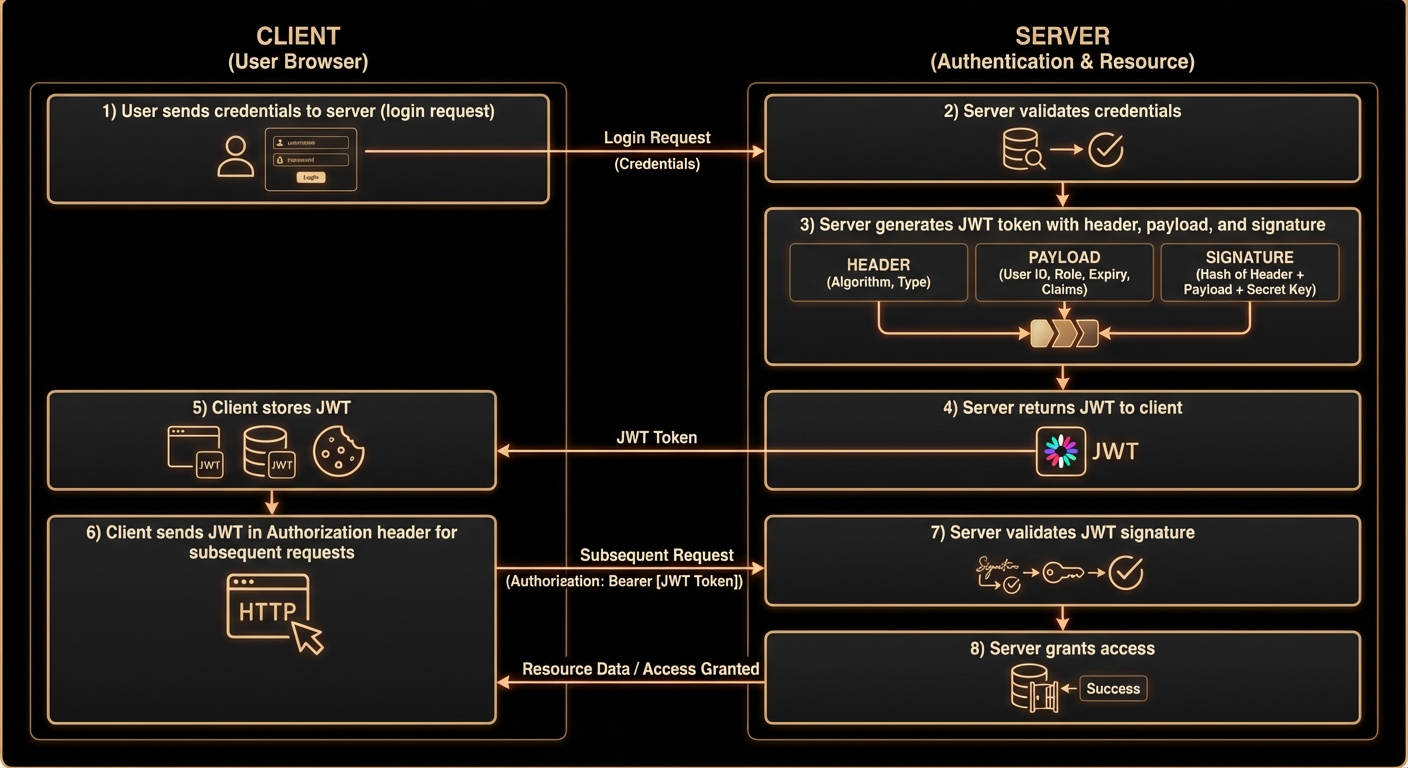
Complete JWT authentication flow from login to protected resource access
User Login
The user sends their credentials (username and password) to the authentication endpoint,
typically via a POST request to /api/auth/login.
Server Validates Credentials
The server checks the credentials against the database. If valid, it proceeds to generate a JWT. If invalid, it returns a 401 Unauthorized response.
JWT Generation
The server creates a JWT containing the user's information (user ID, roles, etc.) and signs it with a secret key. The token includes an expiration time for security.
Token Returned to Client
The server sends the JWT back to the client in the response body. The client receives and stores this token (typically in memory, localStorage, or a secure cookie).
Client Stores Token
The client application stores the JWT securely. For web apps, this might be in memory or localStorage. For mobile apps, secure storage mechanisms are used.
Subsequent Requests
For every subsequent request to protected endpoints, the client includes the JWT in the
Authorization header: Authorization: Bearer <token>
Server Validates Token
The server extracts the JWT from the Authorization header, verifies the signature using the secret key, checks expiration, and validates claims.
Access Granted or Denied
If the token is valid, the server processes the request and returns the response. If invalid or expired, it returns a 401 Unauthorized response.
Example: Login Request
POST /api/auth/login

Content-Type: application/json


{

  "username": "omar",

  "password": "securePassword123"

}
Example: Login Response
HTTP/1.1 200 OK

Content-Type: application/json


{

  "token": "eyJhbGciOiJIUzI1NiIsInR5cCI6IkpXVCJ9...",

  "expiresIn": 3600

}
Example: Protected Resource Request
GET /api/user/profile

Authorization: Bearer eyJhbGciOiJIUzI1NiIsInR5cCI6IkpXVCJ9...
Signature Verification: The Security Core
The signature is what makes JWT trustworthy. Without proper signature verification, an attacker could forge tokens and impersonate any user. Let's understand exactly how signing and verification work.
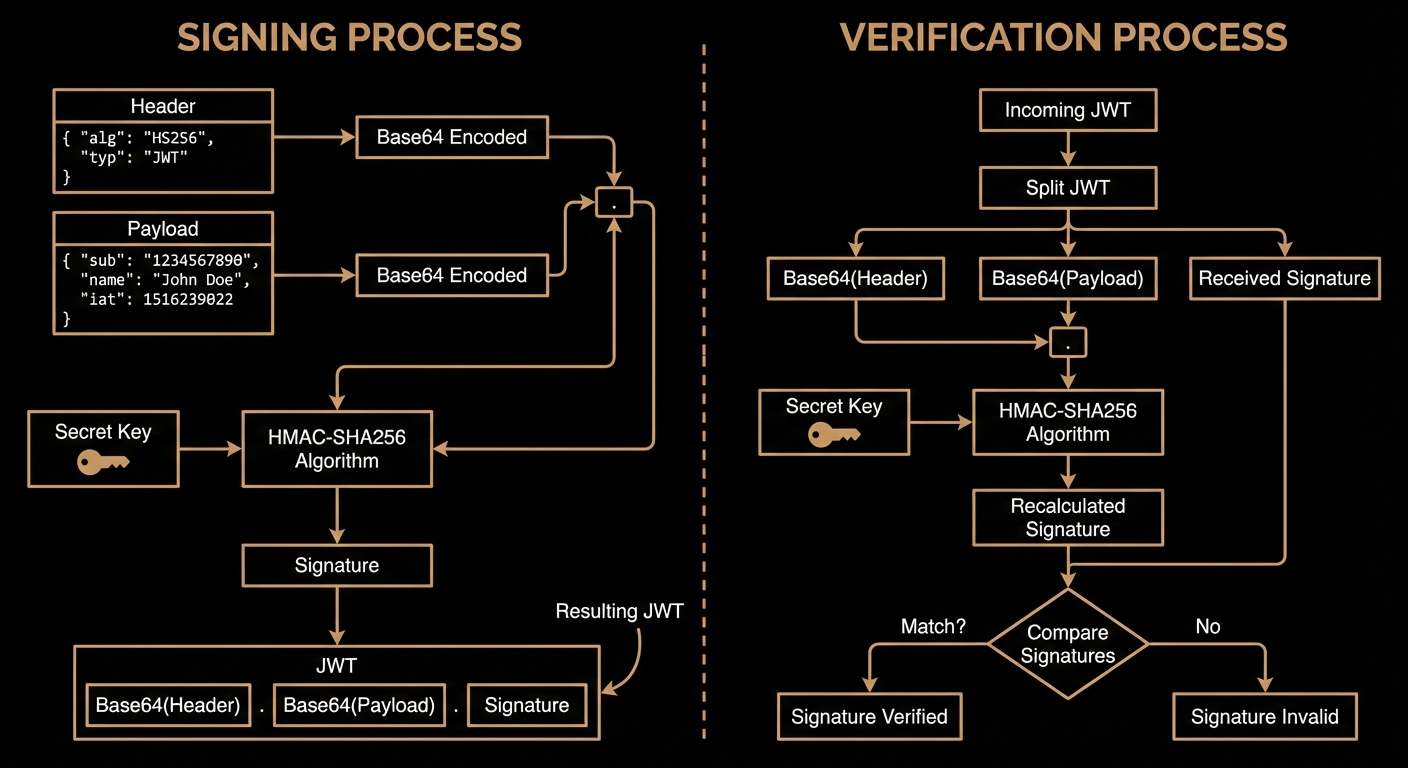
How JWT signatures are created and verified
Signing Process (Server Side)
When the server creates a JWT, it follows these steps:
- Create the header JSON and Base64Url encode it
- Create the payload JSON and Base64Url encode it
- Concatenate them with a dot:
encodedHeader.encodedPayload - Apply the cryptographic algorithm (e.g., HMAC-SHA256) using the secret key
- Base64Url encode the resulting signature
- Concatenate all three parts:
encodedHeader.encodedPayload.signature
// Pseudocode for JWT signing

const header = base64UrlEncode(JSON.stringify({

  alg: "HS256",

  typ: "JWT"

}));


const payload = base64UrlEncode(JSON.stringify({

  sub: "1234567890",

  name: "Omar Dawoud",

  iat: 1516239022

}));


const signature = base64UrlEncode(

  HMACSHA256(header + "." + payload, SECRET_KEY)

);


const jwt = header + "." + payload + "." + signature;
Verification Process (Server Side)
When the server receives a JWT, it must verify it before trusting the claims:
- Split the token into three parts: header, payload, signature
- Decode the header to determine the algorithm
- Recreate the signature using the same algorithm and secret key
- Compare the recreated signature with the received signature
- If they match, the token is valid; if not, reject it
- Check expiration time (
expclaim) - Validate other claims as needed
// Pseudocode for JWT verification

const [header, payload, receivedSignature] = jwt.split(".");


// Recreate the signature

const expectedSignature = base64UrlEncode(

  HMACSHA256(header + "." + payload, SECRET_KEY)

);


// Compare signatures

if (expectedSignature !== receivedSignature) {

  throw new Error("Invalid signature");

}


// Decode and check expiration

const decodedPayload = JSON.parse(base64UrlDecode(payload));

if (decodedPayload.exp < Date.now() / 1000) {

  throw new Error("Token expired");

}


// Token is valid!
Session-Based vs Token-Based Authentication
Understanding the difference between traditional session-based authentication and JWT token-based authentication is crucial for choosing the right approach for your application.
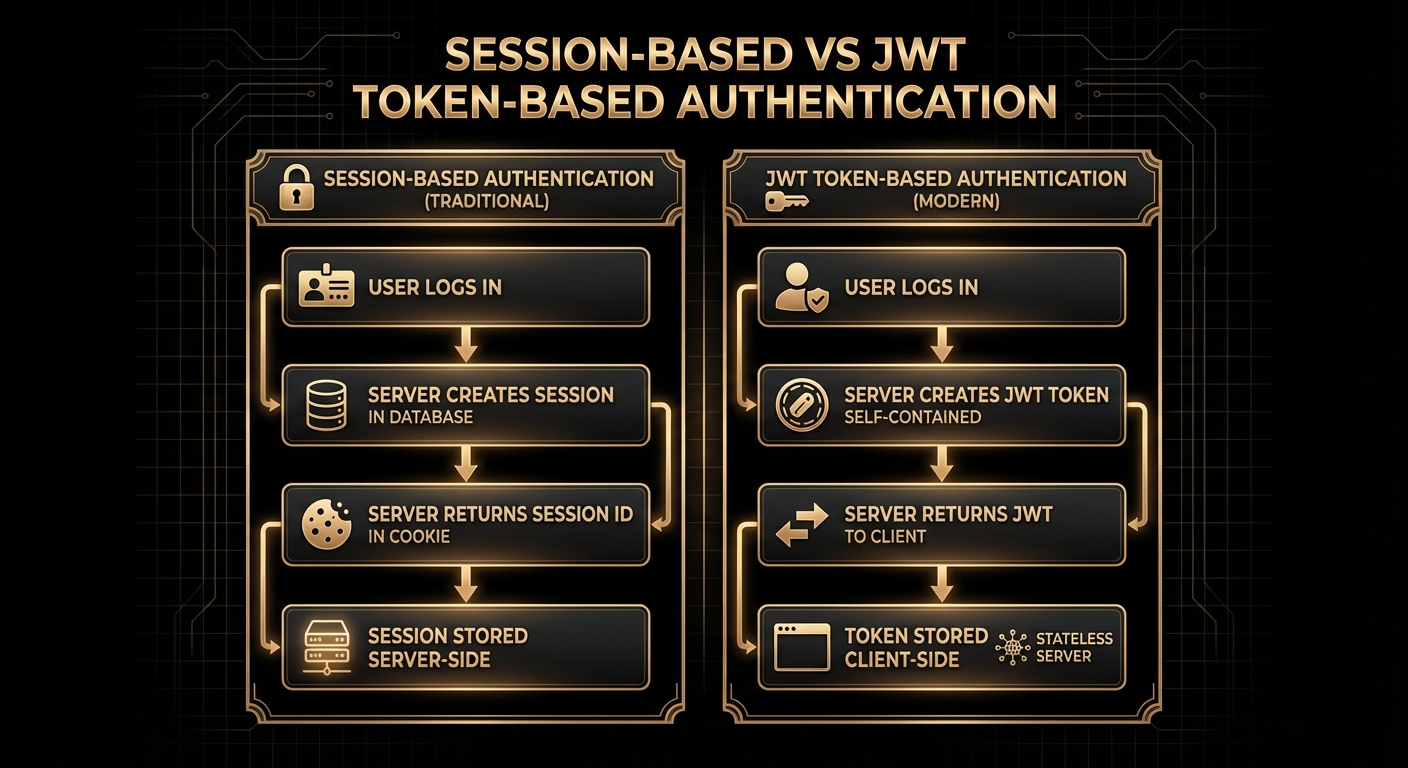
Comparing session-based and JWT token-based authentication
Session-Based Authentication
- Server stores session data in memory or database
- Session ID sent to client in cookie
- Server looks up session on each request
- Stateful - server must remember sessions
- Easy to revoke sessions immediately
- Requires sticky sessions in load balancing
- Memory overhead grows with users
JWT Token-Based Authentication
- No server-side session storage needed
- JWT sent in Authorization header
- Server only validates signature
- Stateless - server doesn't store anything
- Cannot revoke tokens before expiration*
- Works seamlessly across multiple servers
- Constant memory usage regardless of users
* Token revocation requires additional mechanisms like token blacklisting or refresh token rotation
When to Use JWT
- Microservices: Multiple services need to validate authentication without sharing session storage
- Mobile Apps: Stateless authentication works better for mobile clients
- Single Page Applications (SPAs): API-based architecture benefits from stateless tokens
- Cross-Domain Authentication: JWT works well across different domains
- Scalability: Horizontal scaling is easier without session state
When to Use Sessions
- Traditional Web Apps: Server-rendered pages with server-side state
- Immediate Revocation Required: Need to instantly invalidate user sessions
- Simple Architecture: Single server or tightly coupled system
- Sensitive Applications: Banking or healthcare where token theft is a major concern
Security Best Practices
JWT is secure when implemented correctly, but there are many pitfalls that can compromise your application's security. Here are the essential best practices you must follow.
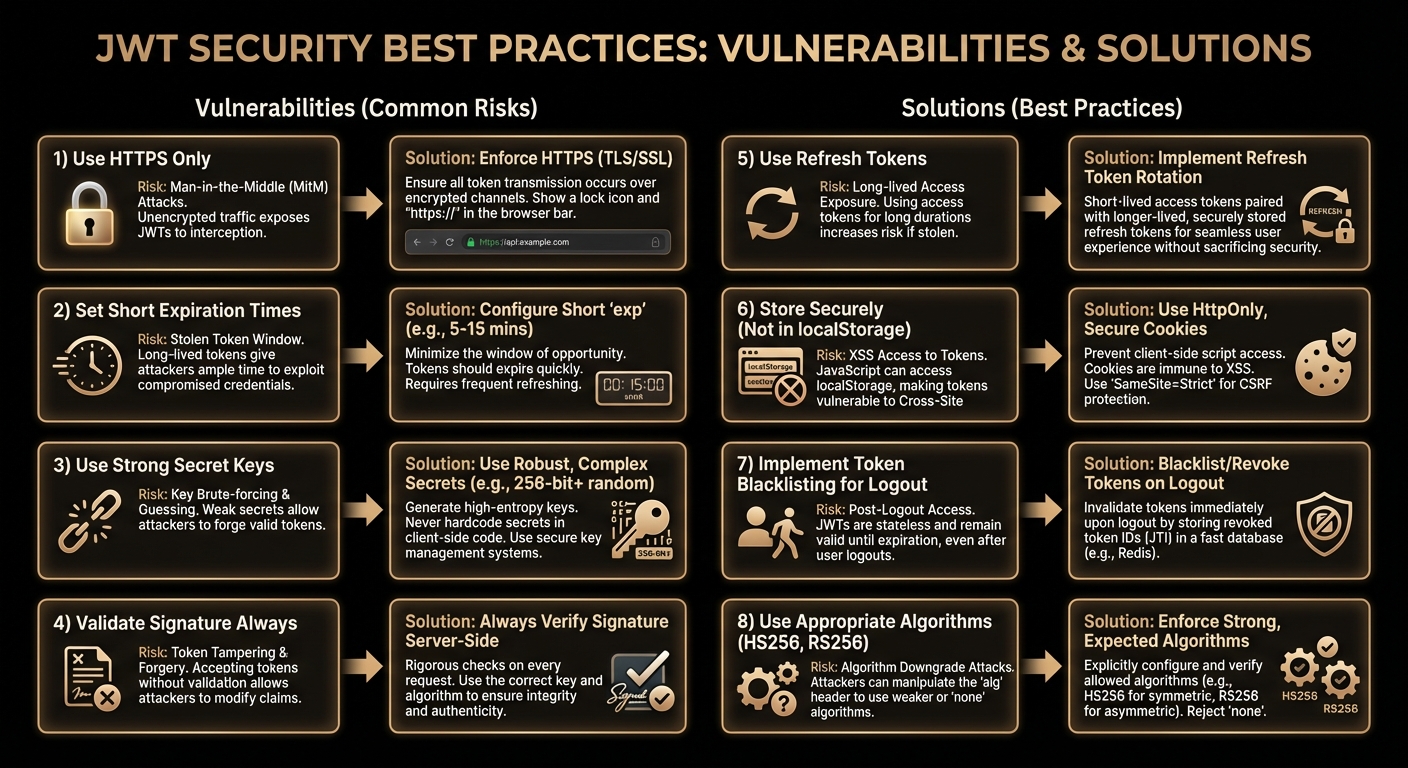
Essential security practices for JWT implementation
Security Checklist
- Always use HTTPS: Never transmit JWTs over unencrypted connections
- Use strong secret keys: Minimum 256 bits of random data for HS256
- Set short expiration times: 15 minutes to 1 hour for access tokens
- Implement refresh tokens: Long-lived tokens for obtaining new access tokens
- Validate all claims: Check issuer, audience, expiration, and custom claims
- Use appropriate algorithms: HS256 for symmetric, RS256 for asymmetric
- Never store sensitive data: Remember that payload is only encoded, not encrypted
- Implement token blacklisting: For logout and compromised tokens
1. Always Use HTTPS
JWTs are bearer tokens—anyone who possesses the token can use it. If transmitted over HTTP, an attacker can intercept it via man-in-the-middle attacks.
2. Use Strong Secret Keys
The security of HMAC-based JWTs (HS256) depends entirely on the secret key. A weak secret can be brute-forced.
// Bad - Weak secret

const SECRET = "mysecret";


// Good - Strong random secret (256+ bits)

const SECRET = "a8f5f167f44f4964e6c998dee827110c"

             + "3a9d3c2e9f1a4e8b7c6d5e4f3a2b1c0d";


// Best - Use environment variables

const SECRET = process.env.JWT_SECRET;
3. Set Short Expiration Times
Access tokens should have short lifespans (15-60 minutes). If a token is stolen, it's only valid for a limited time.
const accessToken = jwt.sign(

  { userId: user.id, role: user.role },

  SECRET,

  { expiresIn: '15m' } // 15 minutes

);


const refreshToken = jwt.sign(

  { userId: user.id },

  REFRESH_SECRET,

  { expiresIn: '7d' } // 7 days

);
4. Implement Refresh Tokens
Use a two-token system: short-lived access tokens and long-lived refresh tokens. When the access token expires, use the refresh token to get a new one without requiring the user to log in again.
// Refresh token endpoint

POST /api/auth/refresh

Content-Type: application/json


{

  "refreshToken": "eyJhbGciOiJIUzI1NiIsInR5cCI6IkpXVCJ9..."

}


// Response with new access token

{

  "accessToken": "eyJhbGciOiJIUzI1NiIsInR5cCI6IkpXVCJ9...",

  "expiresIn": 900

}
5. Validate the Algorithm
Always specify and validate the algorithm. The "none" algorithm vulnerability allows attackers to bypass signature verification.
// Bad - Accepts any algorithm

jwt.verify(token, SECRET);


// Good - Explicitly specify algorithm

jwt.verify(token, SECRET, { algorithms: ['HS256'] });
6. Secure Token Storage
Where you store JWTs on the client side matters:
- Memory (React state, variables): Most secure but lost on page refresh
- HttpOnly Cookies: Secure from XSS but vulnerable to CSRF (use CSRF tokens)
- localStorage: Vulnerable to XSS attacks, avoid for sensitive applications
- sessionStorage: Better than localStorage but still vulnerable to XSS
7. Implement Token Blacklisting
Since JWTs are stateless, you can't revoke them before expiration. Implement a blacklist (or whitelist) for critical scenarios like logout or account compromise.
// Store blacklisted tokens in Redis with expiration

const blacklistToken = async (token, expiresIn) => {

  const decoded = jwt.decode(token);

  const ttl = decoded.exp - Math.floor(Date.now() / 1000);

  await redis.setex(`blacklist:${token}`, ttl, 'true');

};


// Check blacklist before validating

const isBlacklisted = await redis.get(`blacklist:${token}`);

if (isBlacklisted) {

  throw new Error('Token has been revoked');

}
8. Common Vulnerabilities to Avoid
Complete Spring Boot Implementation
Let's put it all together with a complete Spring Boot implementation that follows all security best practices.
1. Dependencies (pom.xml)
<dependency>

    <groupId>io.jsonwebtoken</groupId>

    <artifactId>jjwt-api</artifactId>

    <version>0.12.3</version>

</dependency>

<dependency>

    <groupId>io.jsonwebtoken</groupId>

    <artifactId>jjwt-impl</artifactId>

    <version>0.12.3</version>

</dependency>

<dependency>

    <groupId>io.jsonwebtoken</groupId>

    <artifactId>jjwt-jackson</artifactId>

    <version>0.12.3</version>

</dependency>
2. Application Properties
# application.yml

jwt:

  secret: your-256-bit-secret-key-here-make-it-strong

  access-token-expiration: 900000  # 15 minutes in ms

  refresh-token-expiration: 604800000  # 7 days in ms

  issuer: myapp.com

  audience: myapp-users
3. JWT Utility Service
@Service

public class JwtService {


    @Value("${jwt.secret}")

    private String secretKey;


    @Value("${jwt.access-token-expiration}")

    private Long accessTokenExpiration;


    @Value("${jwt.refresh-token-expiration}")

    private Long refreshTokenExpiration;


    private SecretKey getSigningKey() {

        byte[] keyBytes = Decoders.BASE64.decode(secretKey);

        return Keys.hmacShaKeyFor(keyBytes);

    }


    public String generateAccessToken(Long userId, String role) {

        return Jwts.builder()

            .subject(userId.toString())

            .claim("role", role)

            .issuer("myapp.com")

            .audience().add("myapp-users").and()

            .issuedAt(new Date())

            .expiration(new Date(System.currentTimeMillis()

                + accessTokenExpiration))

            .signWith(getSigningKey())

            .compact();

    }


    public String generateRefreshToken(Long userId) {

        return Jwts.builder()

            .subject(userId.toString())

            .issuedAt(new Date())

            .expiration(new Date(System.currentTimeMillis()

                + refreshTokenExpiration))

            .signWith(getSigningKey())

            .compact();

    }


    public Claims extractClaims(String token) {

        return Jwts.parser()

            .verifyWith(getSigningKey())

            .build()

            .parseSignedClaims(token)

            .getPayload();

    }


    public Long extractUserId(String token) {

        return Long.parseLong(extractClaims(token).getSubject());

    }


    public boolean isTokenValid(String token) {

        try {

            Claims claims = extractClaims(token);

            return !claims.getExpiration().before(new Date());

        } catch (Exception e) {

            return false;

        }

    }

}
4. JWT Authentication Filter
@Component

public class JwtAuthenticationFilter extends OncePerRequestFilter {


    @Autowired

    private JwtService jwtService;


    @Autowired

    private RedisTemplate<String, String> redisTemplate;


    @Override

    protected void doFilterInternal(

            HttpServletRequest request,

            HttpServletResponse response,

            FilterChain filterChain

    ) throws ServletException, IOException {


        String authHeader = request.getHeader("Authorization");


        if (authHeader == null || !authHeader.startsWith("Bearer ")) {

            filterChain.doFilter(request, response);

            return;

        }


        String token = authHeader.substring(7);


        try {

            // Check if token is blacklisted

            Boolean isBlacklisted = redisTemplate

                .hasKey("blacklist:" + token);


            if (Boolean.TRUE.equals(isBlacklisted)) {

                response.setStatus(HttpServletResponse.SC_UNAUTHORIZED);

                return;

            }


            if (jwtService.isTokenValid(token)) {

                Long userId = jwtService.extractUserId(token);

                Claims claims = jwtService.extractClaims(token);


                UsernamePasswordAuthenticationToken authentication =

                    new UsernamePasswordAuthenticationToken(

                        userId, null,

                        List.of(new SimpleGrantedAuthority(

                            claims.get("role", String.class)))

                    );


                SecurityContextHolder.getContext()

                    .setAuthentication(authentication);

            }

        } catch (Exception e) {

            response.setStatus(HttpServletResponse.SC_FORBIDDEN);

            return;

        }


        filterChain.doFilter(request, response);

    }

}
5. Authentication Controller
@RestController

@RequestMapping("/api/auth")

public class AuthController {


    @Autowired

    private JwtService jwtService;


    @Autowired

    private UserRepository userRepository;


    @Autowired

    private PasswordEncoder passwordEncoder;


    @PostMapping("/login")

    public ResponseEntity<?> login(@RequestBody LoginRequest request) {

        User user = userRepository.findByUsername(request.getUsername())

            .orElseThrow(() -> new BadCredentialsException(

                "Invalid credentials"));


        if (!passwordEncoder.matches(request.getPassword(),

                user.getPassword())) {

            throw new BadCredentialsException("Invalid credentials");

        }


        String accessToken = jwtService.generateAccessToken(

            user.getId(), user.getRole());

        String refreshToken = jwtService.generateRefreshToken(

            user.getId());


        return ResponseEntity.ok(new AuthResponse(

            accessToken, refreshToken, 900));

    }


    @PostMapping("/logout")

    public ResponseEntity<?> logout(

            @RequestHeader("Authorization") String authHeader) {

        String token = authHeader.substring(7);

        Claims claims = jwtService.extractClaims(token);


        long ttl = claims.getExpiration().getTime()

            - System.currentTimeMillis();


        // Add to blacklist

        redisTemplate.opsForValue().set(

            "blacklist:" + token, "true",

            ttl, TimeUnit.MILLISECONDS);


        return ResponseEntity.ok(

            Map.of("message", "Logged out successfully"));

    }

}
6. Protected Endpoints
@RestController

@RequestMapping("/api/users")

public class UserController {


    @Autowired

    private UserRepository userRepository;


    @GetMapping("/profile")

    public ResponseEntity<User> getProfile() {

        Long userId = (Long) SecurityContextHolder.getContext()

            .getAuthentication().getPrincipal();


        User user = userRepository.findById(userId)

            .orElseThrow(() -> new ResourceNotFoundException(

                "User not found"));


        return ResponseEntity.ok(user);

    }


    @DeleteMapping("/{id}")

    @PreAuthorize("hasAuthority('ADMIN')")

    public ResponseEntity<?> deleteUser(@PathVariable Long id) {

        userRepository.deleteById(id);

        return ResponseEntity.ok(

            Map.of("success", true));

    }

}
Conclusion
JWT provides a powerful, stateless authentication mechanism perfect for modern distributed applications. When implemented correctly with proper security practices, it offers an excellent balance of security, scalability, and developer experience.
- JWT consists of three parts: header, payload, and signature
- The signature ensures token integrity and authenticity
- Always use HTTPS and strong secret keys
- Implement short-lived access tokens with refresh tokens
- Never store sensitive data in the payload
- Validate algorithms and all claims
- Use token blacklisting for logout and revocation
Remember: JWT is a tool, not a silver bullet. Understand your application's security requirements and choose the authentication strategy that best fits your needs. Sometimes traditional sessions are the better choice, and that's perfectly fine.