Introduction
REST (Representational State Transfer) APIs are the backbone of modern web applications. A well-designed REST API is intuitive, consistent, and a joy to work with. A poorly designed one leads to confusion, bugs, and frustrated developers.
This guide covers the essential best practices for building professional REST APIs, from proper HTTP method usage to response design, error handling, and security considerations.
What we will discuss :
- Proper use of HTTP methods (GET, POST, PUT, PATCH, DELETE)
- HTTP status codes and when to use them
- Why mutations should return the updated resource
- Request and response design patterns
- API versioning strategies
- Error handling best practices
- Security and authentication
- Pagination, filtering, and sorting
HTTP Methods: Use Them Correctly
HTTP methods (also called verbs) define the type of operation being performed. Using them correctly makes your API predictable and RESTful.
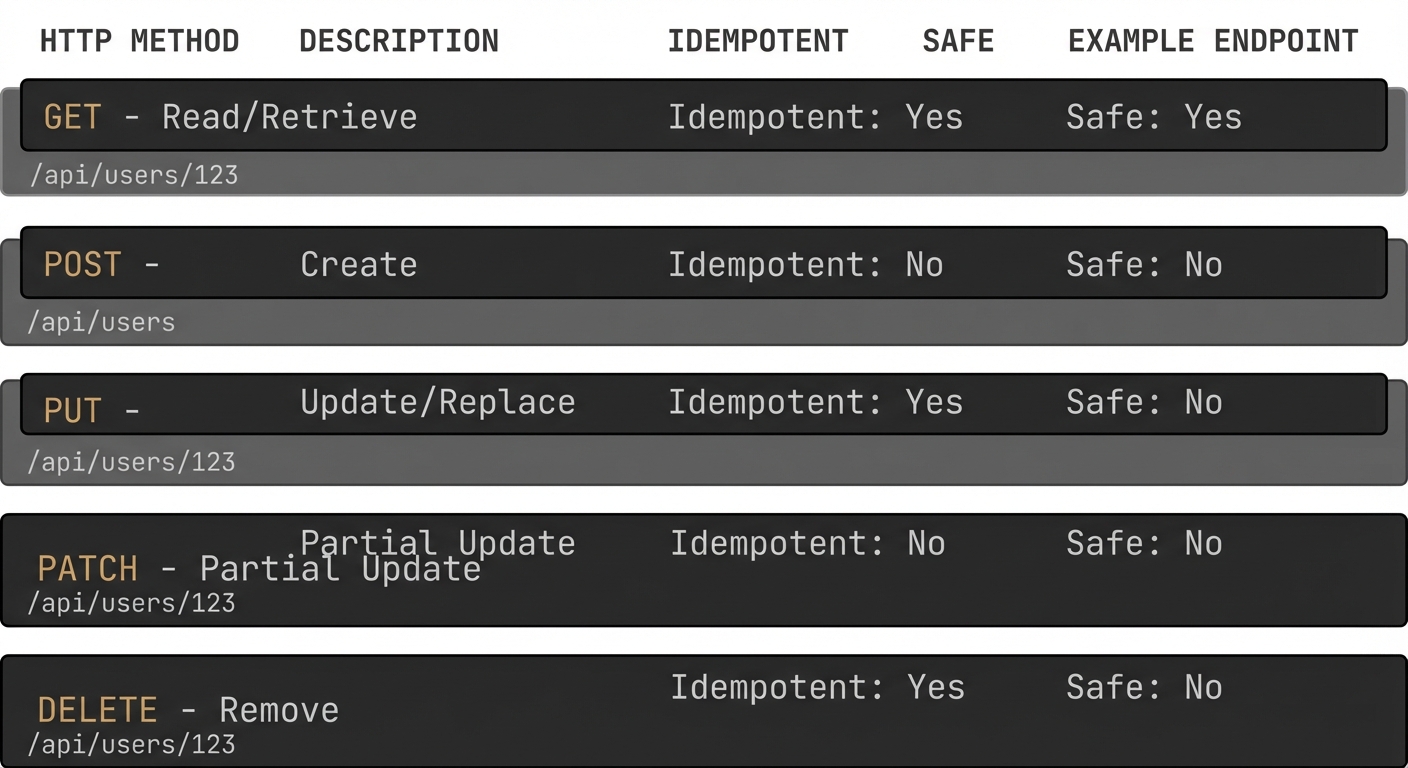
Figure 1: HTTP methods with their purposes, idempotency, and safety characteristics.
GET - Retrieve Resources
Use GET to retrieve data. GET requests should be safe (no side effects) and idempotent (multiple identical requests have the same effect as one).
GET /api/users          # Get all users
GET /api/users/123      # Get user with ID 123
GET /api/users/123/posts # Get posts by user 123
Response: 200 OK with the resource(s) in the body
POST - Create Resources
Use POST to create new resources. POST is not idempotent—multiple identical requests create multiple resources.
POST /api/users
Content-Type: application/json

{
  "name": "Omar Dawoud",
  "email": "Omar@example.com"
}
Response: 201 Created with the created resource in the body and a
Location header pointing to the new resource:
HTTP/1.1 201 Created
Location: /api/users/124
Content-Type: application/json

{
  "id": 124,
  "name": "Omar Dawoud",
  "email": "Omar@example.com",
  "createdAt": "2025-11-21T10:00:00Z"
}
PUT - Update/Replace Resources
Use PUT to completely replace a resource. PUT is idempotent—multiple identical requests have the same result.
PUT /api/users/123
Content-Type: application/json

{
  "name": "Omar Dawoud",
  "email": "Omar@example.com"
}
Response: 200 OK with the updated resource in the body
DELETE - Remove Resources
Use DELETE to remove resources. DELETE is idempotent—deleting the same resource multiple times has the same effect.
DELETE /api/users/123Response: 204 No Content (or 200 OK with a confirmation message)
Critical Rule: Mutations Should Return the Resource
Every mutation (POST, PUT, PATCH) should return the updated/created resource. This is one of the most important REST API best practices.
Why This Matters
- Avoid Extra Requests: Clients don't need to make a follow-up GET request to see the result
-
Server-Generated Fields: The server often adds fields like
id,createdAt,updatedAt, computed values, etc. - Consistency: The client sees exactly what was saved, including any transformations or defaults applied by the server
- Optimistic UI Updates: Clients can immediately update their UI with the server's response
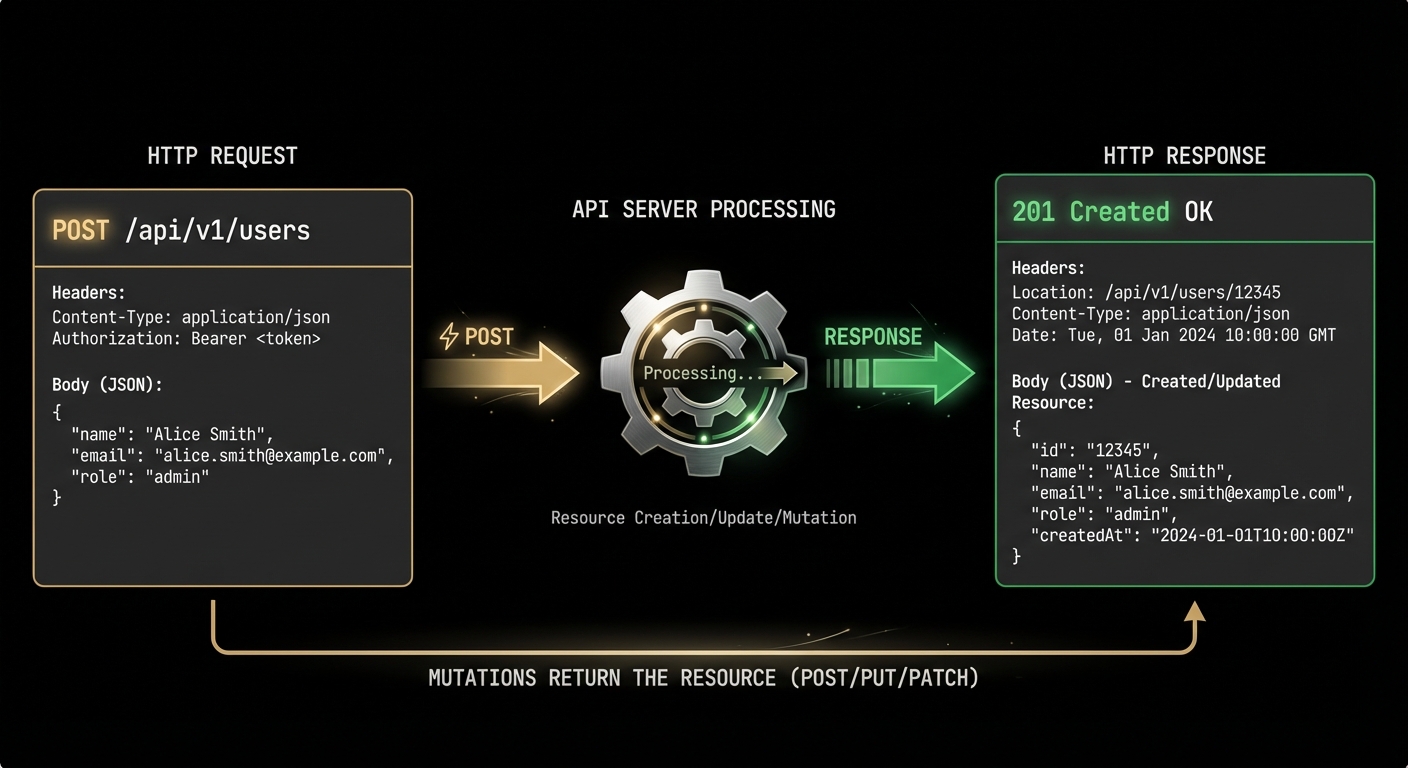
Figure 2: POST/PUT/PATCH requests should return the created/updated resource in the response body.
Example: Creating a User
Bad Practice: Returning only a success message
// Response - BAD
{
  "message": "User created successfully"
}
Good Practice: Returning the created resource
// Response - GOOD
{
  "id": 124,
  "name": "Omar Dawoud",
  "email": "Omar@example.com",
  "role": "user",
  "createdAt": "2025-11-21T10:00:00Z",
  "updatedAt": "2025-11-21T10:00:00Z"
}
Example: Updating a User
PATCH /api/users/123
Content-Type: application/json

{
  "email": "newemail@example.com"
}
Return the complete updated resource:
{
  "id": 123,
  "name": "Omar Dawoud",
  "email": "Omar@example.com",  // Updated field
  "role": "user",
  "createdAt": "2025-11-20T08:00:00Z",
  "updatedAt": "2025-11-21T10:15:00Z"  // Server updated this
}
HTTP Status Codes
Use appropriate HTTP status codes to communicate the result of an operation. Don't return 200 OK for everything!
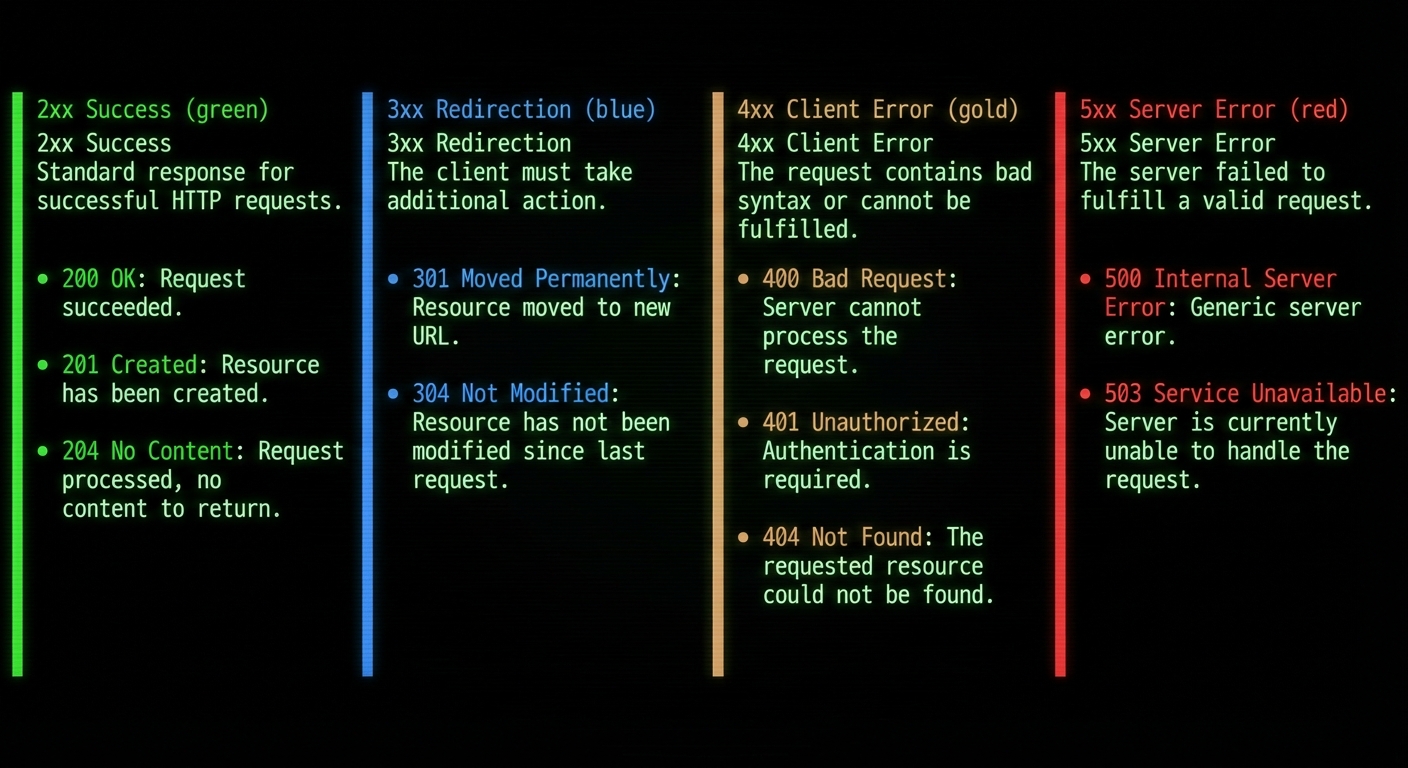
Figure 3: Common HTTP status codes categorized by type (2xx success, 4xx client errors, 5xx server errors).
2xx Success
- 200 OK: Request succeeded (GET, PUT, PATCH)
- 201 Created: Resource created successfully (POST)
- 204 No Content: Request succeeded but no content to return (DELETE)
4xx Client Errors
- 400 Bad Request: Invalid request data (validation errors)
- 401 Unauthorized: Authentication required or failed
- 403 Forbidden: Authenticated but not authorized
- 404 Not Found: Resource doesn't exist
- 409 Conflict: Request conflicts with current state (e.g., duplicate email)
- 422 Unprocessable Entity: Validation errors
- 429 Too Many Requests: Rate limit exceeded
5xx Server Errors
- 500 Internal Server Error: Unexpected server error
- 503 Service Unavailable: Server temporarily unavailable
Example: Proper Status Code Usage
@PostMapping("/users")
public ResponseEntity createUser(@Valid @RequestBody UserDTO userDTO) {
    User user = userService.createUser(userDTO);

    return ResponseEntity
        .status(HttpStatus.CREATED)  // 201 Created
        .header("Location", "/api/users/" + user.getId())
        .body(user);  // Return the created resource
}

@GetMapping("/users/{id}")
public ResponseEntity getUser(@PathVariable Long id) {
    return userService.findById(id)
        .map(user -> ResponseEntity.ok(user))  // 200 OK
        .orElse(ResponseEntity.notFound().build());  // 404 Not Found
}

@DeleteMapping("/users/{id}")
public ResponseEntity deleteUser(@PathVariable Long id) {
    userService.deleteUser(id);
    return ResponseEntity.noContent().build();  // 204 No Content
}
Error Response Design
Provide clear, consistent error responses that help developers understand what went wrong.
Standard Error Format
{
  "error": {
    "code": "VALIDATION_ERROR",
    "message": "Invalid request data",
    "details": [
      {
        "field": "email",
        "message": "Email is already in use"
      },
      {
        "field": "password",
        "message": "Password must be at least 8 characters"
      }
    ],
    "timestamp": "2025-11-21T10:15:00Z",
    "path": "/api/users"
  }
}
Implementation Example
@RestControllerAdvice
public class GlobalExceptionHandler {

    @ExceptionHandler(MethodArgumentNotValidException.class)
    public ResponseEntity handleValidationErrors(
            MethodArgumentNotValidException ex) {

        List fieldErrors = ex.getBindingResult()
            .getFieldErrors()
            .stream()
            .map(error -> new FieldError(
                error.getField(),
                error.getDefaultMessage()
            ))
            .collect(Collectors.toList());

        ErrorResponse errorResponse = ErrorResponse.builder()
            .code("VALIDATION_ERROR")
            .message("Invalid request data")
            .details(fieldErrors)
            .timestamp(Instant.now())
            .path(request.getRequestURI())
            .build();

        return ResponseEntity
            .status(HttpStatus.BAD_REQUEST)
            .body(errorResponse);
    }

    @ExceptionHandler(ResourceNotFoundException.class)
    public ResponseEntity handleNotFound(
            ResourceNotFoundException ex) {

        ErrorResponse errorResponse = ErrorResponse.builder()
            .code("RESOURCE_NOT_FOUND")
            .message(ex.getMessage())
            .timestamp(Instant.now())
            .build();

        return ResponseEntity
            .status(HttpStatus.NOT_FOUND)
            .body(errorResponse);
    }
}
Resource Naming Conventions
Use Nouns, Not Verbs
URLs should represent resources (nouns), not actions (verbs). The HTTP method indicates the action.
Bad:
POST /api/createUser
GET /api/getUser/123
POST /api/deleteUser/123

Good:
POST /api/users
GET /api/users/123
DELETE /api/users/123
Use Plural Names
Collections should use plural names for consistency.
Good:
GET /api/users
GET /api/users/123
GET /api/users/123/posts
GET /api/posts/456/comments
Use Kebab-Case for Multi-Word Resources
Good:
GET /api/user-profiles
GET /api/blog-posts
GET /api/order-items
Nested Resources
For relationships, use nested routes, but don't go too deep (max 2 levels).
Good:
GET /api/users/123/posts
GET /api/posts/456/comments

Too deep:
GET /api/users/123/posts/456/comments/789/replies
Pagination, Filtering, and Sorting
Pagination
Always paginate large collections. Use query parameters for page and size.
GET /api/users?page=1&size=20Response format:
{
  "data": [
    { "id": 1, "name": "User 1" },
    { "id": 2, "name": "User 2" }
  ],
  "pagination": {
    "page": 1,
    "size": 20,
    "totalPages": 5,
    "totalElements": 100,
    "hasNext": true,
    "hasPrevious": false
  }
}
Filtering
Use query parameters for filtering.
GET /api/users?role=admin&status=active
GET /api/products?category=electronics&minPrice=100&maxPrice=500
Sorting
Use a sort parameter with field name and direction.
GET /api/users?sort=createdAt,desc
GET /api/products?sort=price,asc&sort=name,asc
Combined Example
GET /api/products?category=electronics&minPrice=100&page=1&size=20&sort=price,ascSecurity Best Practices
1. Use HTTPS
Always use HTTPS in production. Never transmit sensitive data over HTTP.
2. Authentication
Use industry-standard authentication mechanisms:
- JWT (JSON Web Tokens): For stateless APIs
- OAuth 2.0: For third-party integrations
- API Keys: For service-to-service communication
GET /api/users/me
Authorization: Bearer eyJhbGciOiJIUzI1NiIsInR5cCI6IkpXVCJ9...
3. Input Validation
Always validate and sanitize input data.
public class UserDTO {
    @NotBlank(message = "Name is required")
    @Size(min = 2, max = 100)
    private String name;

    @NotBlank(message = "Email is required")
    @Email(message = "Invalid email format")
    private String email;

    @NotBlank(message = "Password is required")
    @Size(min = 8, message = "Password must be at least 8 characters")
    private String password;
}
4. CORS Configuration
Configure CORS properly for browser-based clients.
@Configuration
public class CorsConfig {
    @Bean
    public WebMvcConfigurer corsConfigurer() {
        return new WebMvcConfigurer() {
            @Override
            public void addCorsMappings(CorsRegistry registry) {
                registry.addMapping("/api/**")
                    .allowedOrigins("https://yourdomain.com")
                    .allowedMethods("GET", "POST", "PUT", "PATCH", "DELETE")
                    .allowedHeaders("*")
                    .allowCredentials(true);
            }
        };
    }
}
5. Security Headers
X-Content-Type-Options: nosniff
X-Frame-Options: DENY
X-XSS-Protection: 1; mode=block
Strict-Transport-Security: max-age=31536000; includeSubDomains
API Documentation
Good documentation is essential. Use tools like Swagger/OpenAPI to generate interactive documentation.
OpenAPI/Swagger Example
@RestController
@RequestMapping("/api/users")
@Tag(name = "Users", description = "User management endpoints")
public class UserController {

    @Operation(summary = "Get all users", description = "Returns a paginated list of users")
    @ApiResponses(value = {
        @ApiResponse(responseCode = "200", description = "Success"),
        @ApiResponse(responseCode = "401", description = "Unauthorized")
    })
    @GetMapping
    public ResponseEntity> getAllUsers(
            @Parameter(description = "Page number") @RequestParam(defaultValue = "0") int page,
            @Parameter(description = "Page size") @RequestParam(defaultValue = "20") int size) {
        // Implementation
    }
}
What to Document
- All endpoints with descriptions
- Request/response examples
- Authentication requirements
- Error codes and messages
- Pagination details
Conclusion
Building a great REST API requires attention to detail and consistency. By following these best practices, you'll create APIs that are intuitive, maintainable, and a pleasure to work with.
Key Takeaways:
- Use HTTP methods correctly (GET, POST, PUT, PATCH, DELETE)
- Always return the created/updated resource from mutations
- Use appropriate HTTP status codes
- Design consistent error responses
- Use nouns for resources, not verbs
- Implement pagination, filtering, and sorting
- Prioritize security (HTTPS, authentication, validation)
- Document everything with OpenAPI/Swagger
Remember: a well-designed API is an investment. It reduces bugs, improves developer experience, and makes your application easier to maintain and scale.