Introduction
Spring Security is the de facto standard for securing Spring-based applications. Whether you're building a REST API, a web application, or a microservices architecture, understanding how Spring Security works under the hood is crucial for implementing robust authentication and authorization.
In this comprehensive guide, we'll explore the core architecture of Spring Security, understand how authentication flows through the system, and learn best practices for securing your applications.
What you'll learn:
- The complete authentication flow in Spring Security
- How security filters intercept and process requests
- The role of AuthenticationManager and Providers
- How Spring Security stores authentication state
- Practical configuration examples
- Common pitfalls and best practices
Spring Security Core Architecture
At its heart, Spring Security is built around a filter chain that intercepts HTTP requests. Each filter has a specific responsibility, from parsing credentials to enforcing access control.
The Big Picture
When a user tries to access a protected resource, their request goes through multiple layers:
- Security Filters intercept the request
- Credentials are extracted and wrapped in an Authentication object
- The AuthenticationManager delegates to appropriate providers
- AuthenticationProviders verify credentials (database, LDAP, OAuth, etc.)
- If successful, authentication is stored in the SecurityContext
- The request proceeds to the protected resource
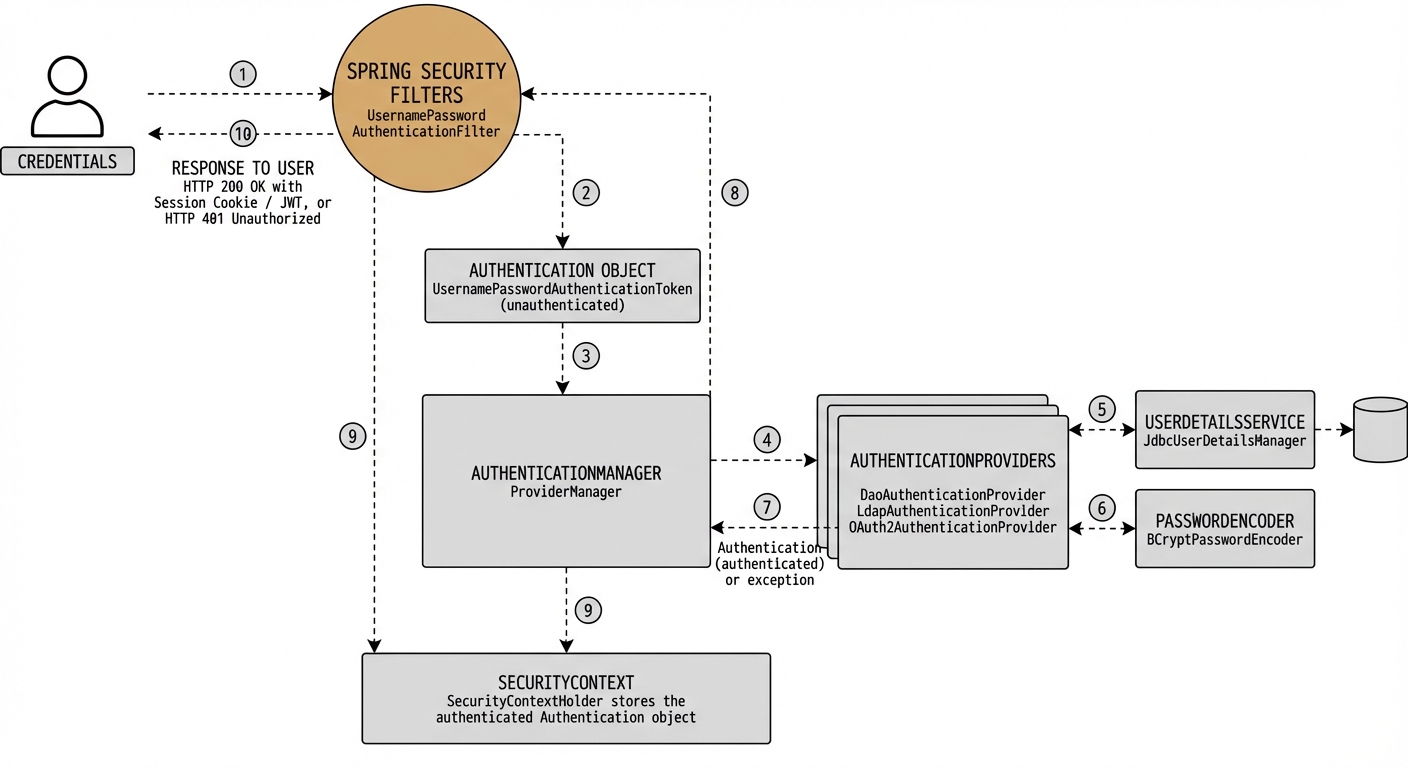
Figure 1: Complete Spring Security authentication flow showing how requests are processed through filters, authentication manager, and providers.
The Authentication Flow: Step by Step
Let's walk through what happens when a user submits their credentials:
Step 1: Request Interception
The user sends a request with credentials (username/password, JWT token, etc.). Spring Security's filter chain intercepts this request before it reaches your controllers.
Step 2: Authentication Object Creation
The appropriate filter (e.g., UsernamePasswordAuthenticationFilter) extracts the
credentials and creates an unauthenticated Authentication object.
// Simplified example
UsernamePasswordAuthenticationToken authRequest =
    new UsernamePasswordAuthenticationToken(username, password);
Step 3: Delegation to AuthenticationManager
The filter passes the Authentication object to the
AuthenticationManager, which is typically implemented by
ProviderManager.
Step 4: Provider Selection
The AuthenticationManager iterates through configured
AuthenticationProviders until it finds one that supports the authentication type.
Step 5: Credential Verification
The selected provider (e.g., DaoAuthenticationProvider) retrieves user details from
the UserDetailsService and compares the provided password with the stored hash using
the PasswordEncoder.
Step 6: Authentication Success
If credentials are valid, the provider returns a fully authenticated
Authentication object containing:
- Principal (user details)
- Credentials (usually cleared for security)
- Authorities (roles/permissions)
- Authenticated flag set to
true
Step 7: SecurityContext Storage
The authenticated Authentication object is stored in the
SecurityContextHolder, making it available throughout the request lifecycle.
SecurityContextHolder.getContext().setAuthentication(authentication);Step 8: Access Granted
The request proceeds to the protected resource. You can access the authenticated user anywhere in your code:
Authentication auth = SecurityContextHolder.getContext().getAuthentication();
String username = auth.getName();
Collection authorities = auth.getAuthorities();
The Security Filter Chain
Spring Security uses a chain of filters to process requests. Each filter has a specific responsibility and executes in a defined order.
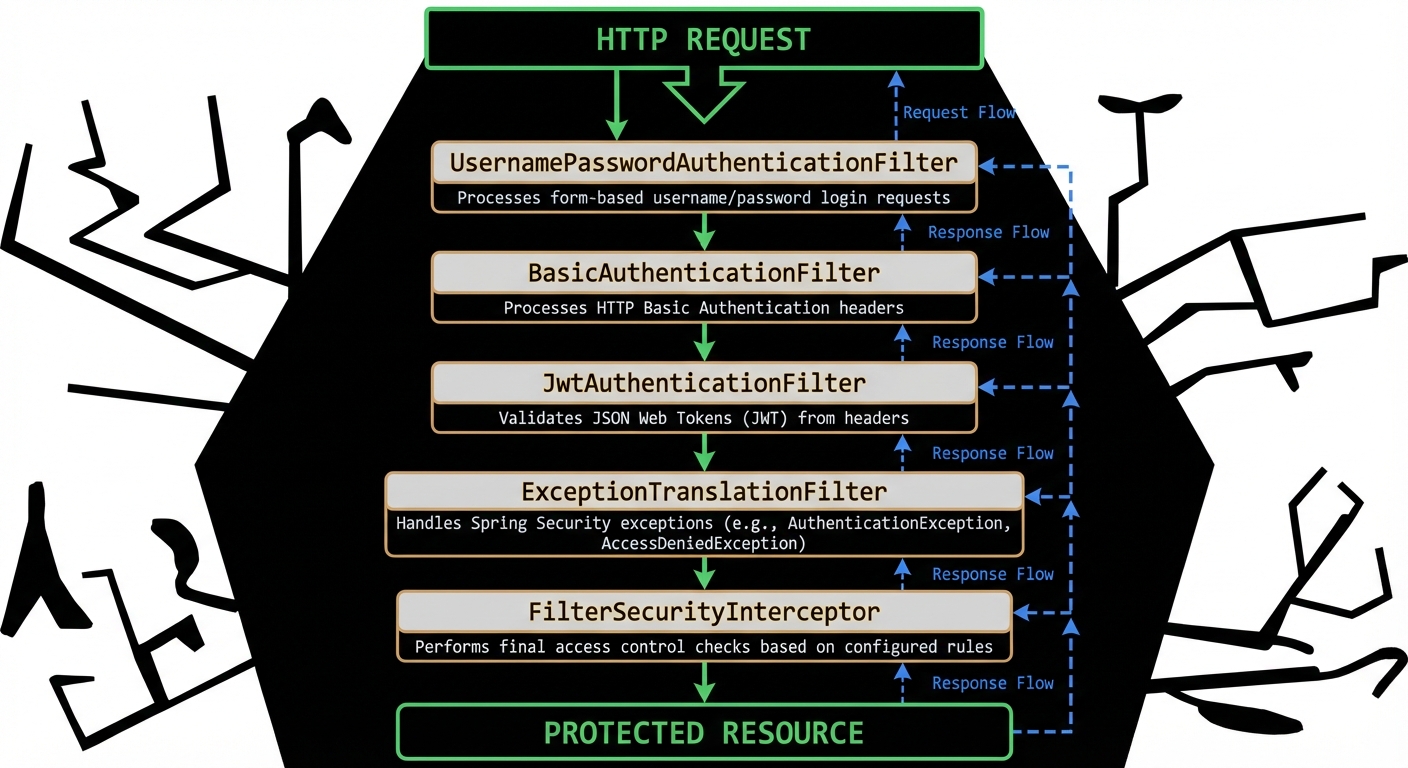
Figure 2: The Spring Security filter chain showing how requests flow through different filters before reaching protected resources.
Key Filters
UsernamePasswordAuthenticationFilter
Processes form-based login requests. Extracts username and password from the request and attempts authentication.
- Default URL:
/login(POST) - Parameters:
usernameandpassword - Success: Redirects to default success URL or saved request
- Failure: Redirects to login page with error
BasicAuthenticationFilter
Processes HTTP Basic authentication. Extracts credentials from the Authorization
header.
Authorization: Basic dXNlcm5hbWU6cGFzc3dvcmQ=JwtAuthenticationFilter (Custom)
For JWT-based authentication, you typically create a custom filter to extract and validate tokens.
ExceptionTranslationFilter
Handles security exceptions. Converts AccessDeniedException and
AuthenticationException into appropriate HTTP responses.
FilterSecurityInterceptor
The final filter in the chain. Enforces authorization rules defined in your security configuration.
AuthenticationManager and Providers
The AuthenticationManager is the core interface for authentication. Its main
implementation, ProviderManager, delegates to a list of
AuthenticationProviders.
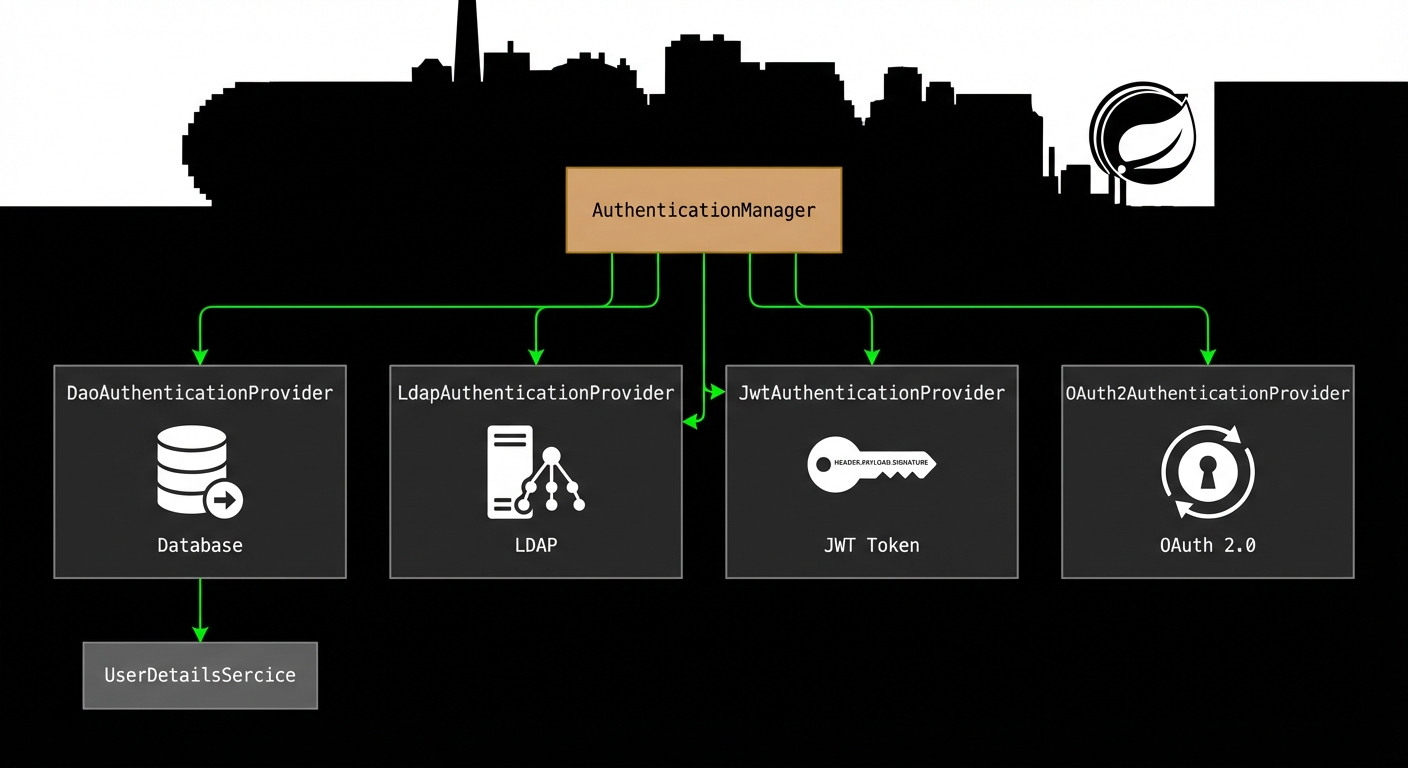
Figure 3: AuthenticationManager delegates to different providers based on authentication type (database, LDAP, JWT, OAuth).
Common Authentication Providers
DaoAuthenticationProvider
The most common provider. Retrieves user details from a UserDetailsService (typically
a database) and verifies passwords using a PasswordEncoder.
@Bean
public DaoAuthenticationProvider authenticationProvider() {
    DaoAuthenticationProvider provider = new DaoAuthenticationProvider();
    provider.setUserDetailsService(userDetailsService);
    provider.setPasswordEncoder(passwordEncoder());
    return provider;
}
LdapAuthenticationProvider
Authenticates users against an LDAP directory. Useful for enterprise environments with centralized user management.
JwtAuthenticationProvider (Custom)
For JWT-based authentication, you create a custom provider that validates tokens and extracts user information.
OAuth2AuthenticationProvider
Handles OAuth 2.0 and OpenID Connect authentication. Validates tokens from external identity providers (Google, GitHub, etc.).
UserDetailsService
The UserDetailsService interface has a single method: load user details by username.
This is where you connect Spring Security to your user database.
Implementation Example
@Service
public class CustomUserDetailsService implements UserDetailsService {

    @Autowired
    private UserRepository userRepository;

    @Override
    public UserDetails loadUserByUsername(String username)
            throws UsernameNotFoundException {

        User user = userRepository.findByUsername(username)
            .orElseThrow(() ->
                new UsernameNotFoundException("User not found: " + username));

        return org.springframework.security.core.userdetails.User
            .withUsername(user.getUsername())
            .password(user.getPassword())
            .authorities(user.getRoles())
            .accountExpired(false)
            .accountLocked(false)
            .credentialsExpired(false)
            .disabled(false)
            .build();
    }
}
Key Points
- Return a
UserDetailsobject with username, password, and authorities - Throw
UsernameNotFoundExceptionif user doesn't exist - The password should be already encoded in your database
- Authorities represent roles/permissions (e.g., "ROLE_USER", "ROLE_ADMIN")
Password Encoding
Never store passwords in plain text! Spring Security provides
PasswordEncoder implementations for secure password hashing.
BCryptPasswordEncoder (Recommended)
BCrypt is a strong, adaptive hashing algorithm that includes a salt and can be configured to be slower over time as hardware improves.
@Bean
public PasswordEncoder passwordEncoder() {
    return new BCryptPasswordEncoder();
}
Encoding Passwords
@Autowired
private PasswordEncoder passwordEncoder;

public void registerUser(String username, String rawPassword) {
    String encodedPassword = passwordEncoder.encode(rawPassword);
    // Save user with encodedPassword to database
}
Verification
Spring Security automatically verifies passwords during authentication. The
DaoAuthenticationProvider calls:
passwordEncoder.matches(rawPassword, encodedPassword)SecurityContext and SecurityContextHolder
The SecurityContext holds the Authentication object for the current
request. It's stored in the SecurityContextHolder, which uses a
ThreadLocal by default.
Accessing the Current User
// In a controller or service
Authentication authentication = SecurityContextHolder.getContext().getAuthentication();

if (authentication != null && authentication.isAuthenticated()) {
    String username = authentication.getName();
    Object principal = authentication.getPrincipal();
    Collection authorities = authentication.getAuthorities();
}
Using @AuthenticationPrincipal
Spring provides a convenient annotation to inject the current user directly into controller methods:
@GetMapping("/profile")
public ResponseEntity getProfile(
        @AuthenticationPrincipal UserDetails userDetails) {

    String username = userDetails.getUsername();
    // ... fetch and return user profile
}
Storage Strategies
- MODE_THREADLOCAL (default): Each thread has its own SecurityContext
- MODE_INHERITABLETHREADLOCAL: Child threads inherit parent's context
- MODE_GLOBAL: Single context for entire JVM (rarely used)
Security Configuration
Spring Security 6+ uses a component-based configuration approach. Here's a complete example:
Complete Configuration Example
@Configuration
@EnableWebSecurity
@EnableMethodSecurity
public class SecurityConfig {

    @Autowired
    private UserDetailsService userDetailsService;

    @Bean
    public SecurityFilterChain filterChain(HttpSecurity http) throws Exception {
        http
            .csrf(csrf -> csrf.disable()) // Disable for APIs, enable for web apps
            .authorizeHttpRequests(auth -> auth
                .requestMatchers("/api/public/**").permitAll()
                .requestMatchers("/api/admin/**").hasRole("ADMIN")
                .requestMatchers("/api/user/**").hasAnyRole("USER", "ADMIN")
                .anyRequest().authenticated()
            )
            .sessionManagement(session -> session
                .sessionCreationPolicy(SessionCreationPolicy.STATELESS) // For JWT
            )
            .httpBasic(Customizer.withDefaults()) // Enable Basic Auth
            .formLogin(form -> form
                .loginPage("/login")
                .defaultSuccessUrl("/dashboard")
                .permitAll()
            )
            .logout(logout -> logout
                .logoutUrl("/logout")
                .logoutSuccessUrl("/login?logout")
                .permitAll()
            );

        return http.build();
    }

    @Bean
    public AuthenticationManager authenticationManager(
            AuthenticationConfiguration config) throws Exception {
        return config.getAuthenticationManager();
    }

    @Bean
    public PasswordEncoder passwordEncoder() {
        return new BCryptPasswordEncoder();
    }
}
Method-Level Security
Use annotations to secure individual methods:
@Service
public class UserService {

    @PreAuthorize("hasRole('ADMIN')")
    public void deleteUser(Long userId) {
        // Only admins can delete users
    }

    @PreAuthorize("#username == authentication.name or hasRole('ADMIN')")
    public User getUser(String username) {
        // Users can view their own profile, admins can view any
    }

    @PostAuthorize("returnObject.username == authentication.name")
    public User loadUserDetails(Long userId) {
        // Check after method execution
    }
}
JWT Authentication (Bonus)
For stateless REST APIs, JWT (JSON Web Tokens) is a popular choice. Here's how to integrate it with Spring Security:
Custom JWT Filter
@Component
public class JwtAuthenticationFilter extends OncePerRequestFilter {

    @Autowired
    private JwtTokenProvider tokenProvider;

    @Autowired
    private UserDetailsService userDetailsService;

    @Override
    protected void doFilterInternal(HttpServletRequest request,
                                    HttpServletResponse response,
                                    FilterChain filterChain)
            throws ServletException, IOException {

        try {
            String jwt = getJwtFromRequest(request);

            if (jwt != null && tokenProvider.validateToken(jwt)) {
                String username = tokenProvider.getUsernameFromToken(jwt);
                UserDetails userDetails = userDetailsService.loadUserByUsername(username);

                UsernamePasswordAuthenticationToken authentication =
                    new UsernamePasswordAuthenticationToken(
                        userDetails, null, userDetails.getAuthorities());

                SecurityContextHolder.getContext().setAuthentication(authentication);
            }
        } catch (Exception ex) {
            logger.error("Could not set user authentication", ex);
        }

        filterChain.doFilter(request, response);
    }

    private String getJwtFromRequest(HttpServletRequest request) {
        String bearerToken = request.getHeader("Authorization");
        if (bearerToken != null && bearerToken.startsWith("Bearer ")) {
            return bearerToken.substring(7);
        }
        return null;
    }
}
Add Filter to Security Config
@Bean
public SecurityFilterChain filterChain(HttpSecurity http) throws Exception {
    http
        // ... other config
        .addFilterBefore(jwtAuthenticationFilter(),
                        UsernamePasswordAuthenticationFilter.class);

    return http.build();
}
Best Practices
1. Always Use HTTPS in Production
Credentials and tokens should never be transmitted over plain HTTP. Use TLS/SSL certificates.
2. Enable CSRF Protection for Web Apps
If you're building a traditional web application (not a stateless API), keep CSRF protection enabled:
http.csrf(csrf -> csrf
    .csrfTokenRepository(CookieCsrfTokenRepository.withHttpOnlyFalse())
);
3. Use Strong Password Encoding
BCrypt with a work factor of 10-12 is recommended. Avoid MD5, SHA-1, or plain text.
4. Implement Proper Exception Handling
http.exceptionHandling(ex -> ex
    .authenticationEntryPoint(new HttpStatusEntryPoint(HttpStatus.UNAUTHORIZED))
    .accessDeniedHandler((request, response, accessDeniedException) -> {
        response.setStatus(HttpStatus.FORBIDDEN.value());
        response.getWriter().write("Access Denied");
    })
);
5. Secure Sensitive Endpoints
Use the principle of least privilege. Only grant necessary permissions:
auth
    .requestMatchers("/api/admin/**").hasRole("ADMIN")
    .requestMatchers("/api/user/**").hasAnyRole("USER", "ADMIN")
    .requestMatchers("/api/public/**").permitAll()
    .anyRequest().authenticated()
6. Implement Rate Limiting
Protect against brute-force attacks by limiting login attempts. Consider using libraries like Bucket4j or implementing custom rate limiting.
7. Log Security Events
Monitor and log authentication failures, access denials, and suspicious activities.
8. Keep Dependencies Updated
Regularly update Spring Security and related dependencies to patch security vulnerabilities.
9. Use Security Headers
http.headers(headers -> headers
    .contentSecurityPolicy("default-src 'self'")
    .frameOptions().deny()
    .xssProtection().block(true)
);
10. Test Your Security Configuration
Write integration tests to verify that your security rules work as expected:
@SpringBootTest
@AutoConfigureMockMvc
class SecurityConfigTest {

    @Autowired
    private MockMvc mockMvc;

    @Test
    @WithMockUser(roles = "USER")
    void userCanAccessUserEndpoint() throws Exception {
        mockMvc.perform(get("/api/user/profile"))
            .andExpect(status().isOk());
    }

    @Test
    void unauthenticatedUserCannotAccessProtectedEndpoint() throws Exception {
        mockMvc.perform(get("/api/user/profile"))
            .andExpect(status().isUnauthorized());
    }
}
Common Pitfalls to Avoid
1. Storing Passwords in Plain Text
Never store passwords without encoding. Always use
PasswordEncoder.encode() before saving.
2. Disabling CSRF Without Understanding
Don't blindly disable CSRF. Only disable it for stateless APIs that use token-based authentication.
3. Hardcoding Credentials
Use environment variables or secure vaults (like HashiCorp Vault) for sensitive configuration.
4. Incorrect Authority Prefixes
Spring Security expects roles to have the "ROLE_" prefix. Use hasRole("ADMIN") not
hasAuthority("ADMIN") unless you're using custom authorities.
5. Not Clearing SecurityContext
In multi-threaded environments, ensure you clear the SecurityContext when done:
try {
    // ... do work with authentication
} finally {
    SecurityContextHolder.clearContext();
}
Conclusion
Spring Security provides a powerful, flexible framework for securing your applications. By understanding its architecture—from filters to authentication managers to security contexts—you can implement robust security tailored to your specific needs.
Key Takeaways:
- Security filters intercept requests and extract credentials
- AuthenticationManager delegates to providers for credential verification
- UserDetailsService connects Spring Security to your user database
- Always use strong password encoding (BCrypt recommended)
- SecurityContext stores authentication for the current request
- Configure security based on your application type (web app vs. API)
- Follow best practices: HTTPS, CSRF protection, rate limiting, security headers
Whether you're building a traditional web application with form-based login or a modern REST API with JWT authentication, Spring Security has you covered. Start with the basics, understand the flow, and gradually add more sophisticated features as your needs grow.